ConfigMgr and PowerShell-Preparing Your Environment
November 27, 2012 2 Comments
ConfigMgr 2012 SP1 contains almost everything you need to get started with PowerShell and the new ConfigMgr cmdlets. When you install an Admin console (whether local to the site server or on a remote console), you will see the following option to launch PowerShell with ConfigMgr integration:

Note that you must have the ConfigMgr Admin Console installed on the system where you plan to leverage the new cmdlets. Also, be sure to install the Windows Management Framework 3.0 before you attempt to use PowerShell integration with ConfigMgr.
You can launch a PowerShell Prompt from the image displayed above, and it will automatically load the ConfigMgr module, connected to the site code of the site loaded in the admin console. If you prefer to use the Powershell module without the need to launch from the admin console (recall that you must have the console installed in order to use the module), perform the following steps:
- Open an x86 PowerShell Prompt (when possible, use Run As Administrator)
- Run the following command: Import-Module “C:\Program Files (x86)\Microsoft Configuration Manager\AdminConsole\bin\ConfigurationManager.psd1” (modify the path as required for your console installation).
- Verify the module is enabled by running following command: get-command -module ConfigurationManager This will show all commands available from the ConfigMgr 2012 PowerShell Module (as of this post, there are 338 cmdlets in ConfigMgr 2012 SP1 Beta). If you see the ConfigMgr cmdlets, you’re ready to move to the next level! (If you don’t, be sure you launched the x86 version of PowerShell on x64 systems).
- You can then use get-psdrive cmdlet to list the available drives. Notice in the image below that CEN is the site code of my site, and CMSite is the provider.
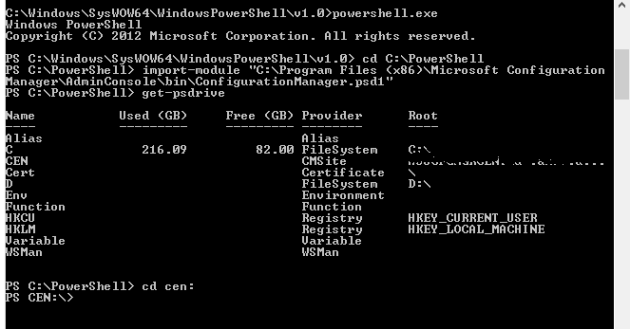
- As shown in the image, simply type cd cen: to navigate to the PowerShell Provider for ConfigMgr site CEN.
- Verify you’re connected to the provider by running the following command: get-cmsite This will list all primary and secondary sites in the hierarchy.

As a best practice, always perform admin functions from the central site. However, if you have multiple primary sites (and a CAS), you may need to connect to additional sites (by default, you will automatically connect to the most recently used site server from the Admin Console). Run the following PowerShell command to connect to the site S01:
new-psdrive -Name "S01" -PSProvider "AdminUI.PS.Provider\CMSite" -Root "MySiteServer.FQDN.COM" -Description "S01 Primary Site"
(Replace “S01” with your site code, “MySiteServer.FQDN.COM” with the FQDN to the provider, and “S01 Primary Site” with a description of the site).
Happy Scripting!
Greg
 Greg's Systems Management Blog