Fix for error in IIS log on MP – (bits_error:,501,0×80070005)

On one of my accounts, we found that hw/sw inventory seems to no longer update.

We found this error in IIS logs on the MP:

(bits_error:,501,0×80070005)

We also noticed that if you go to Server Manager, and open Roles->Web Server (IIS), and select Default Web Site (or the WSUS Administration site), then select BITS Uploads, and then Open Feature, you receive the following message:

“BITS server was unable to read from the IIS Meta-base as it is corrupt. The settings for this virtual Directory have been reset to the BITS defaults. Parameter count mismatch.”

I installed KB2587894, but the error still occurred.

Next, I decided to follow the wisdom of the myITforum and TechNet forums, and reinstall BITS on the server (restart required).  After reinstall, I confirmed that I can open the BITS properties on each web site, and then had to launch mp.msi to get the MP configured properly (the WSUS site seemed to be working OK).  All is well now – inventory is reprorting fine.

Greg
Interesting issue with thumbs.db

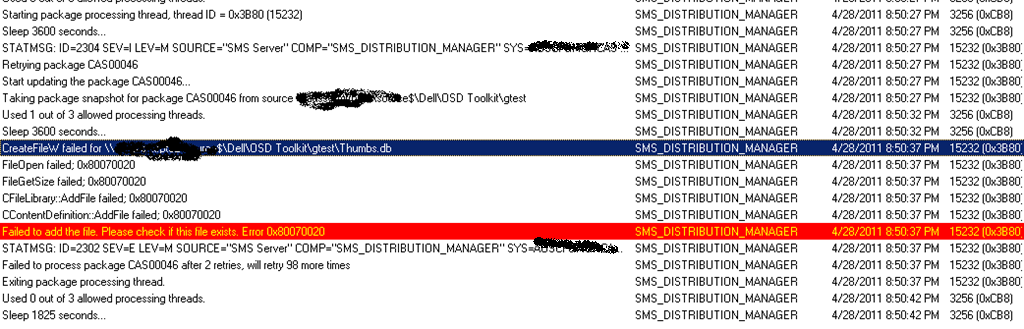
I’m surprised I just ran into this today – seems easy enough to run into a long time ago.  I was working in ConfigMgr 2012 Beta 2, and was receiving failures when sending content to a distribution point. Looking at distmgr.log, I saw the following errors:

CreateFileW failed for \\servername\sharename\thumbs.db

Failed to add the file. Please check if this file exists. Error 0x80070020


Thumbs.db is a hidden file that contains a thumbnail cache for the current directory. I tried to delete the file, and received an error that the file was in use by Windows Explorer. I decided to test this same process in ConfigMgr 2007, and encountered the same issue (which is why I’m surprised I haven’t experienced this issue before). Finally, I terminated and restarted my Windows Explorer process (explorer.exe), and then could successfully delete the evil thumbs.db, and could then update my distribution points successfully.

To prevent this in the future, you need to disable the creation of the thumbnail cache. You can read more for how to disable this using either folder options or group policy. Both links refer to Windows 7, but the same applies to Server 2008R2. You would need to disable this feature on any system you use to browse to the package source. This issue obviously doesn’t occur all the time, but is something to be aware of moving forward.

*Note: this can also affect you if a user who has admin rights browses to a ConfigMgr DP share and thumbs.db is created. Now the hash of this folder if different than ConfigMgr expects, causing a hash mismatch error when running the program.


Greg